
Your guide to surviving the Circus of Horrors
The Freak Circus is a choice-driven visual novel that plays directly in your browser. This guide will help you get started with the game.
Getting Started
- Click "Play Now" on the game embed on this page
- Wait 1-2 minutes for the game to load
- Game Music will start after you enter your name
- Click to advance dialogue and make choices
Game Controls
- Left Click / Tap: Advance dialogue
- Choices: Click option buttons to make decisions
- Menu: Access settings, save/load, and other options
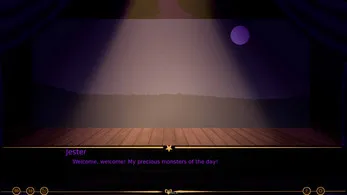
Understanding the Interface
Main Menu
- Start Game: Begin a new playthrough
- Load Game: Continue from a saved point
- Settings: Adjust volume, language, and other options
- Gallery: View unlocked scenes (after earning them)
In-Game
- Dialogue Box: Shows character speech and narration
- Character Portraits: Display who is speaking
- Choice Buttons: 2-3 options for your decisions
- Choice Indicator: Shows your relationship status
Making Choices
Your choices in The Freak Circus matter. They affect:
- Which route you're on (Pierrot or Harlequin)
- Your relationship with each character
- What scenes you unlock
- Which ending you receive
Tips for Choices
- Pay attention to dialogue - Characters often hint at what they want
- Watch for warning signs - Screen shaking means danger ahead
- Save frequently - Wrong choices can lead to Bad Endings
- Consider character preferences - Different routes respond to different choices
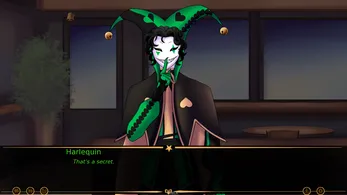
Game Routes
The Freak Circus features multiple routes:
Pierrot Route
The silent, possessive yandere. His obsession is intense but quiet. To follow his route, make choices that show interest in his mysterious nature.
Harlequin Route
The charismatic, dangerous rival. He competes with Pierrot for your attention. To follow his route, make choices that show attraction to his charm and confidence.
Bad Endings
Wrong choices at critical moments can trigger Bad Endings. These usually involve death, kidnapping, or other dark outcomes. Watch for screen shaking warnings!
Pronoun Options
You can choose between He/Him and She/Her pronouns in the game's settings menu. This affects how characters address you.
Language Settings
The game supports multiple languages:
- English
- Portuguese (BR)
- Chinese (Simplified)
Change this in the game's settings menu.
Troubleshooting
Game Won't Load
- Wait 1-2 minutes for the initial load
- Try refreshing the page
- Disable browser extensions that might block scripts
No Sound
- Check your device volume
- Click the sound icon in-game to enable audio
- Some browsers require user interaction before playing sound
Can't Make Choices
- Wait for the choice buttons to appear
- Click directly on the choice text
- Try clicking faster or slower between dialogue
Day 2 Content
Day 2 is now available! This new content includes:
- Fresh story branches
- New characters
- Deeper character interactions
- Darker secrets
Access Day 2 from the menu on the left side of the game screen.
Watch Gameplay Videos
Continue Exploring:
- FAQs - Common questions
- Walkthrough - Route guides